Stop juggling spreadsheets, phone calls, and paper work orders. CRMTX gives you work order management, technician dispatching, scheduling, invoicing, and reporting — all connected, all in real time.
Schedule a live walkthrough • See it in action
From the moment a customer calls to the final invoice — CRMTX handles every step so nothing falls through the cracks.
Create detailed work orders with client info, job descriptions, priority levels, assigned technicians, parts used, and expenses. Track every job from creation to completion.
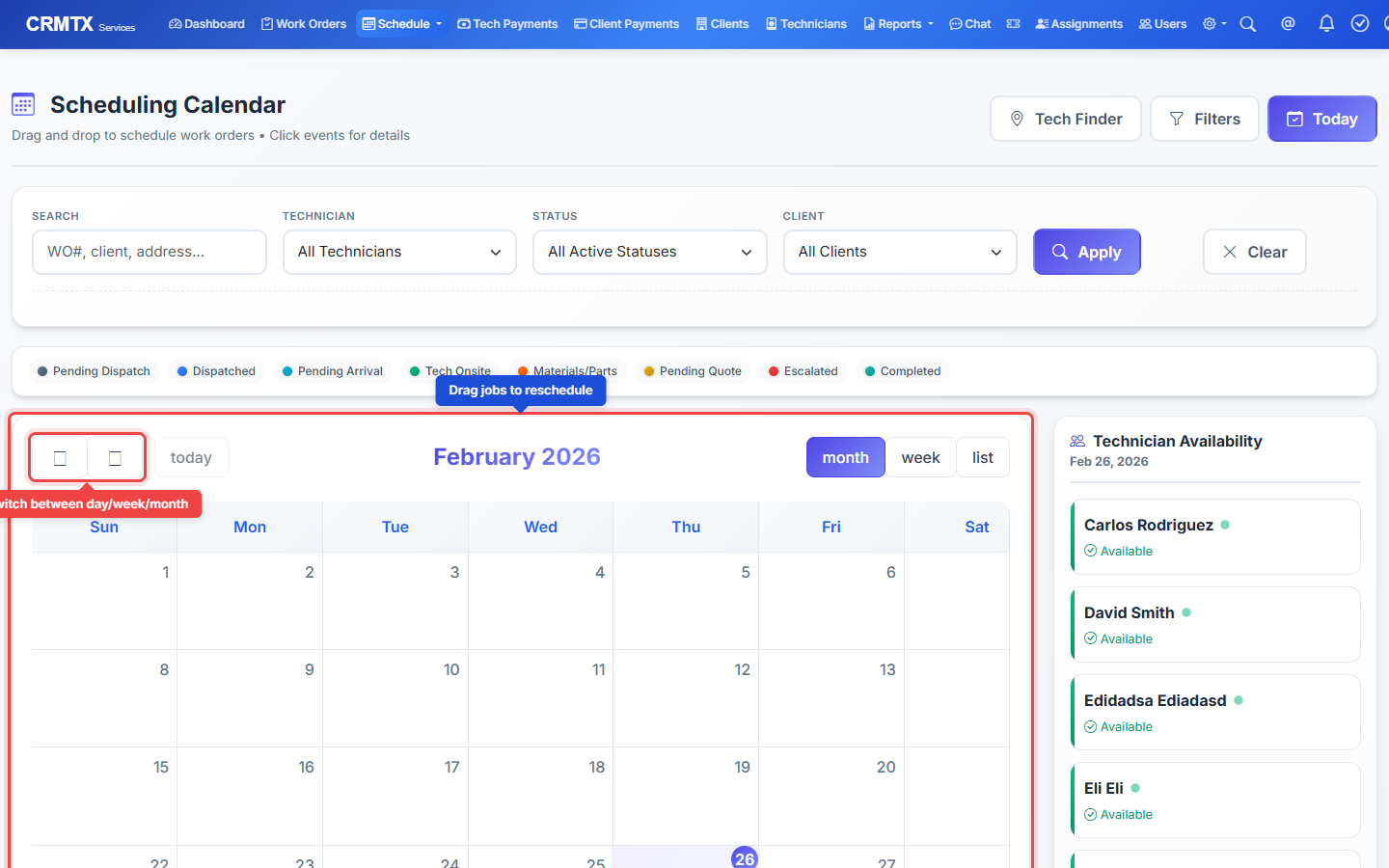
A visual calendar that shows every technician's schedule at a glance. Drag jobs to reassign them, switch between day, week, and month views, and avoid double-bookings.
Generate professional PDF invoices and quotes directly from work orders. Track payment status, send reminders, and keep your cash flow visible at all times.
Maintain complete client profiles with contact details, job history, site notes, open quotes, invoices, and payment records. Everything about a client in one place.
See all your technicians on a live map. Find the closest available tech to a job site and dispatch them instantly based on location and skill set.
Revenue by period, tech performance, job completion rates, open invoices, and expense breakdowns. Real data to help you make real business decisions.
Here's exactly how CRMTX works to streamline your daily operations.
When a customer calls, open CRMTX and click "Create Work Order." Select the client from your database (or add a new one), describe the job, set the priority, choose a category, and assign a technician.
The work order captures everything your tech needs: client address, job description, priority level, and any special instructions. You can also attach photos or documents.
Use the drag-and-drop calendar to schedule jobs across your team. See who's available, who's overbooked, and which time slots are open — all in one view.
Switch between daily, weekly, and monthly views. Drag a work order onto a different day or technician to reschedule instantly. Changes sync across all portals in real time.
When the job is done, generate an invoice directly from the work order. All the job details, parts used, labor hours, and expenses are automatically pulled in — no retyping.
Create professional PDF invoices, email them to clients, and track payment status. You can also generate quotes before starting a job for client approval.
Search any part number across multiple suppliers instantly. See prices ranked from highest to lowest, check real-time stock availability, and find the closest supplier to your job site — all from one screen.
Type in any part number — like WB44T10010 or Samsung washer door seal — and CRMTX searches across multiple suppliers simultaneously. Results come back ranked by price so you can instantly see who has the best deal.
Every result sorted by price so you see the cheapest option first, or flip to highest to compare markup.
Green means in stock, yellow means low stock, red means out. No more calling around to check.
Enter a model number, a part name, or even a description like "GE oven heating element" — CRMTX figures out what you're looking for.
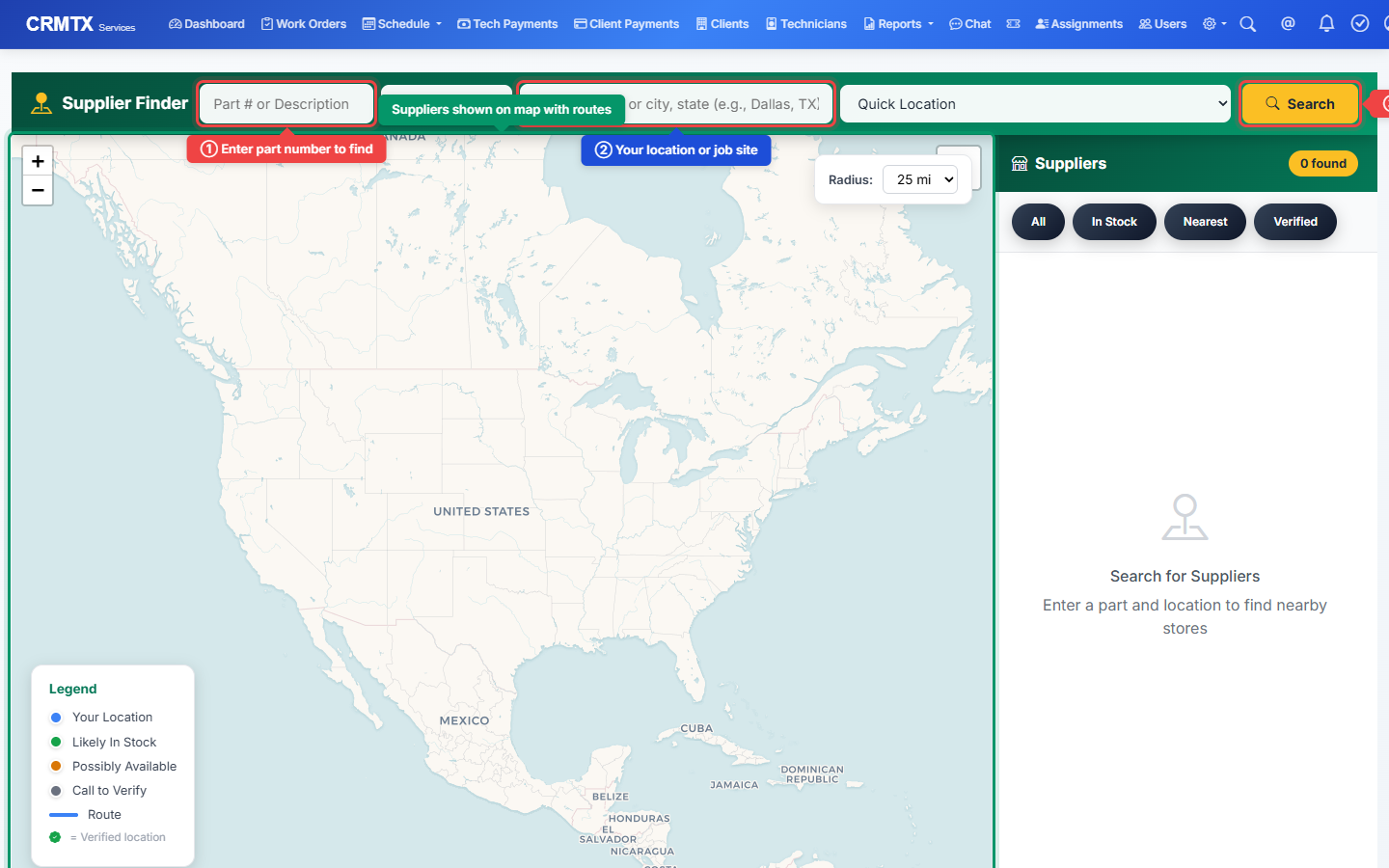
Enter the part you need and a job site address. CRMTX shows you every nearby supplier on an interactive map — with driving routes, distance, and whether they're likely to have your part in stock.
See HVAC supply houses, electrical distributors, and parts stores plotted around the job site.
Click any supplier to see the route from your location — know exactly how far the drive is before you go.
Quickly search from a technician's current location or a recent work order's job site address.
A closer look at the tools that keep your operation running smoothly every day.
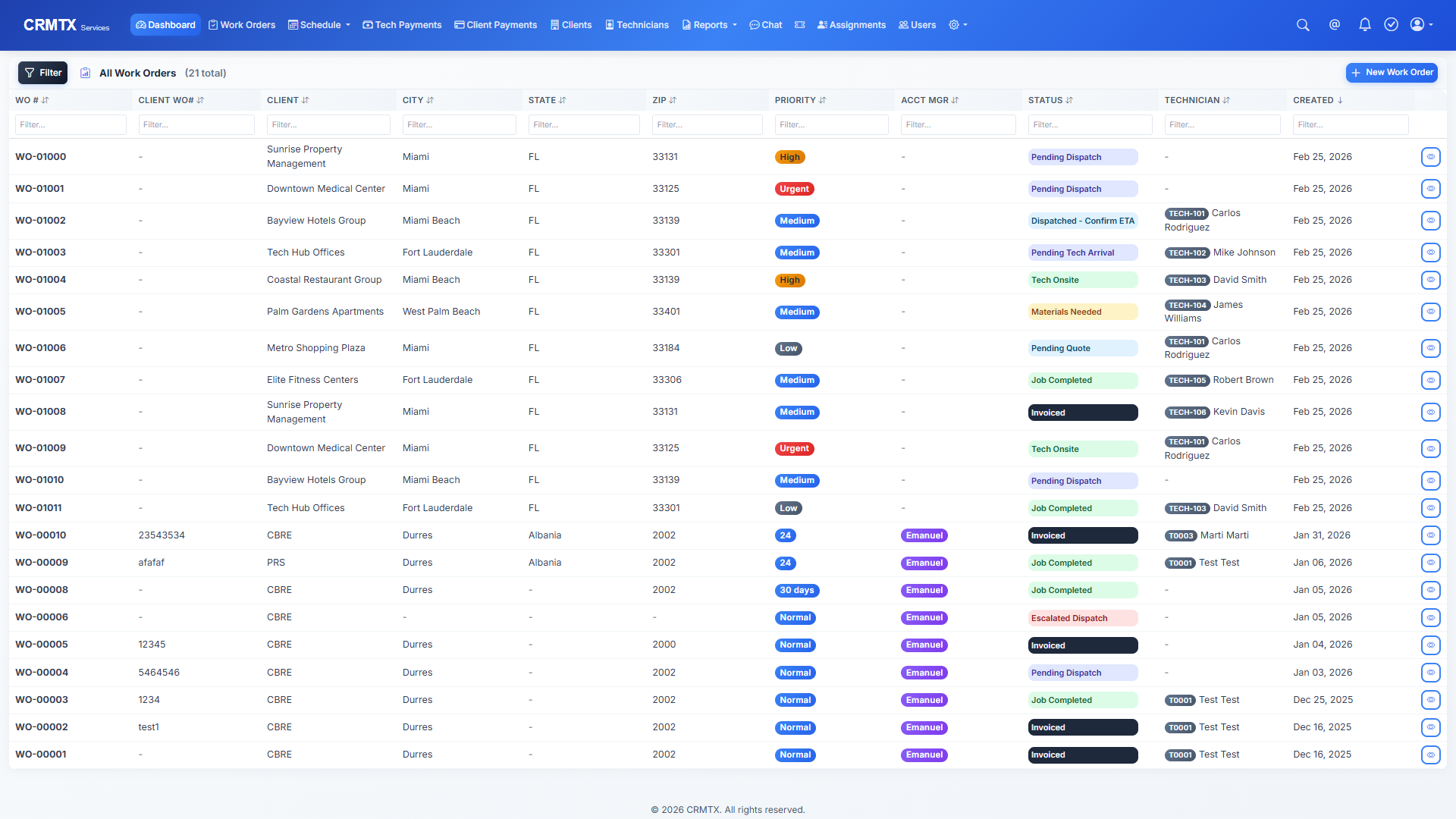
Your work orders page shows every job at a glance — status, client name, assigned tech, priority, and scheduled date. Use filters to show only open jobs, today's jobs, or jobs for a specific tech.
Click any work order to see the full detail view with trip logs, parts used, photos, expenses, and the complete job timeline.
Every client has a complete profile: contact info, service history, site addresses, open quotes, invoices, and payment records. When a repeat customer calls, you instantly see their full history.
Add new clients in seconds. Search your database by name, email, phone, or address. Import existing clients from a CSV file to get started fast.
See all your technicians on an interactive map. When you need to dispatch someone to a job site, the Tech Finder shows you who's closest and available — so you can minimize drive time and respond faster.
Each tech's profile shows their skills, certifications, pay rates, and current availability. Filter by skill set to find the right person for specialized jobs.
Track every part used on every job. When a technician uses a part, it gets logged against the work order — so you know exactly what was installed and how much it cost.
Search for parts by name or SKU, track suppliers, and use the local supplier finder to source parts near the job site.
No consultants, no training sessions, no complex migrations. Create your account, add your team, and start managing work orders the same day.
Admins see everything. Dispatchers manage work orders. Technicians see only their assigned jobs. Everyone gets exactly the view they need — no more, no less.
Most field service software charges per user per month and the cost adds up fast. CRMTX is designed to be affordable for small to mid-size companies — not just enterprises.
Every role in your company gets their own dedicated portal with exactly the features and data they need.
The command center for office staff, dispatchers, and managers. Create work orders, manage clients, generate invoices, view reports, and schedule jobs. Full access to everything.
A mobile-friendly portal for technicians in the field. View assigned jobs, check in and out of job sites, upload before/after photos, log hours, track earnings, and submit expenses.
Tech Management & Dispatch. Review technician applications, manage onboarding, handle contractor packets, and oversee technician compliance and documentation.
Platform-level administration. Manage companies, users, security settings, system backups, and monitor platform health. Designed for system administrators.
CRMTX gives you the numbers that matter — not vanity metrics, but real data that helps you make decisions. See revenue trends, outstanding invoices, tech utilization, and job completion rates.
Built-in messaging for your team — no need for a separate app.
Each company's data is completely isolated. No cross-contamination.
Online application, contractor packet, e-signatures, and compliance tracking.
Try the full system with sample data before adding your own.
Generate professional PDFs for invoices, quotes, and work orders.
Complete audit trail of every action — who did what and when.
Built-in help desk for managing customer issues and requests.
Import clients, work orders, and data from spreadsheets easily.
Everything you need to know before getting started.
We offer flexible plans designed for small to mid-size field service companies. Contact us for a personalized quote based on your team size and needs — no hidden fees, no per-user pricing traps.
Most companies are up and running the same day. Create your account, add your team members, import your clients via CSV, and start creating work orders immediately. No lengthy onboarding process required.
Yes. CRMTX supports CSV import for clients, so you can bring your existing database over in minutes. Just export from your current system (or spreadsheet) and upload directly into CRMTX.
No. The Tech Portal is a mobile-friendly web app — technicians just open it in their phone's browser. No downloads, no app store, no updates to manage. They log in and see their assigned jobs immediately.
Absolutely. CRMTX uses SSL encryption, multi-tenant data isolation (each company's data is completely separated), role-based access controls, and complete audit logging. Your data is never shared between companies.
No long-term contracts. You can cancel anytime. We believe you should stay because the product works for you — not because you're locked into a contract.
CRMTX is built for any company that dispatches technicians to job sites — HVAC, electrical, plumbing, appliance repair, general contracting, landscaping, and more. If you manage work orders and field techs, CRMTX fits your workflow.
Of course. Book a meeting and we'll give you a full walkthrough of the platform — tailored to your specific business. Call us at (516) 716-0989 or email support@crmtx.co.
Schedule a 30-minute live walkthrough with our team. We'll show you how CRMTX handles your specific workflow — not a generic sales pitch.
Prefer to talk now?
(516) 716-0989Join hundreds of service companies who switched to CRMTX and never looked back. Book your free demo today.